Cloudflare (EN)
You can use Cloudflare Workers to serve your booking engine directly under your own custom domain (e.g., booking.yourhotel.com) while keeping your unique tenant IDs completely hidden from your visitors.
Cloudflare Workers offers a generous free tier of up to 100,000 requests per day, which is more than enough for most booking engines. All you need to set it up is a free Cloudflare account.
Proxying your Booking Engine through Cloudflare
Here is the step-by-step process for creating a transparent reverse proxy for your CASABLANCA Booking Engine.
Before you begin
Sign up for a free Cloudflare account if you don't have an account already, and add your domain to Cloudflare.
Ensure your domain's DNS is managed by Cloudflare (your domain should have the 🟠 "Proxied" orange cloud enabled).
Step 1. Create a worker
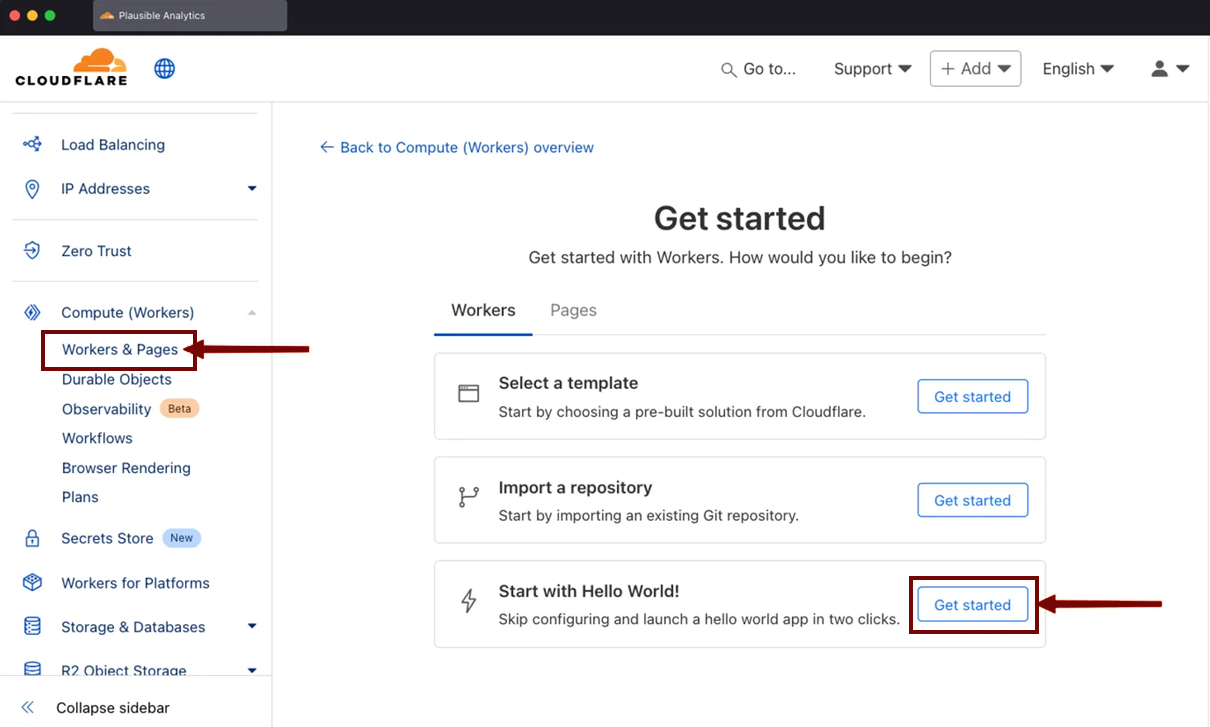
- In your Cloudflare account dashboard, click on Workers & Pages in the left-hand sidebar to access the Overview page.
- Click Create application, and then click Get started.
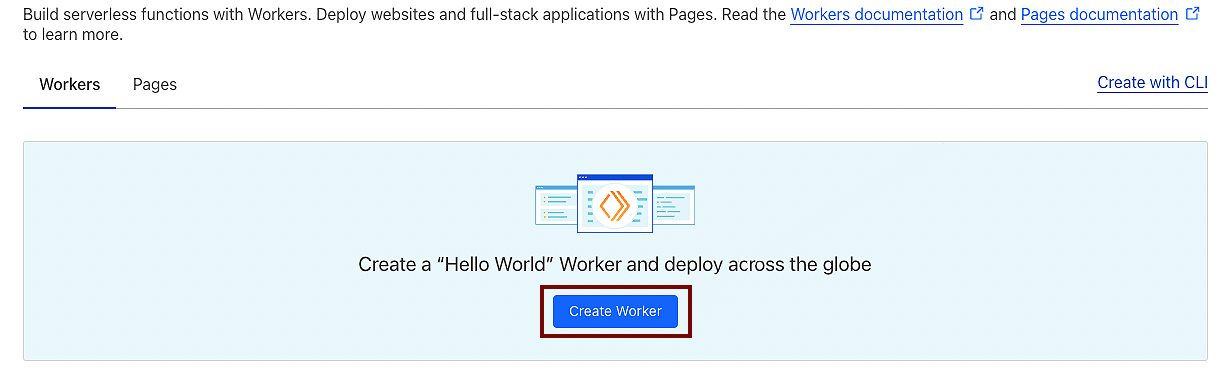
- Click Create Worker.
Step 2. Name your worker
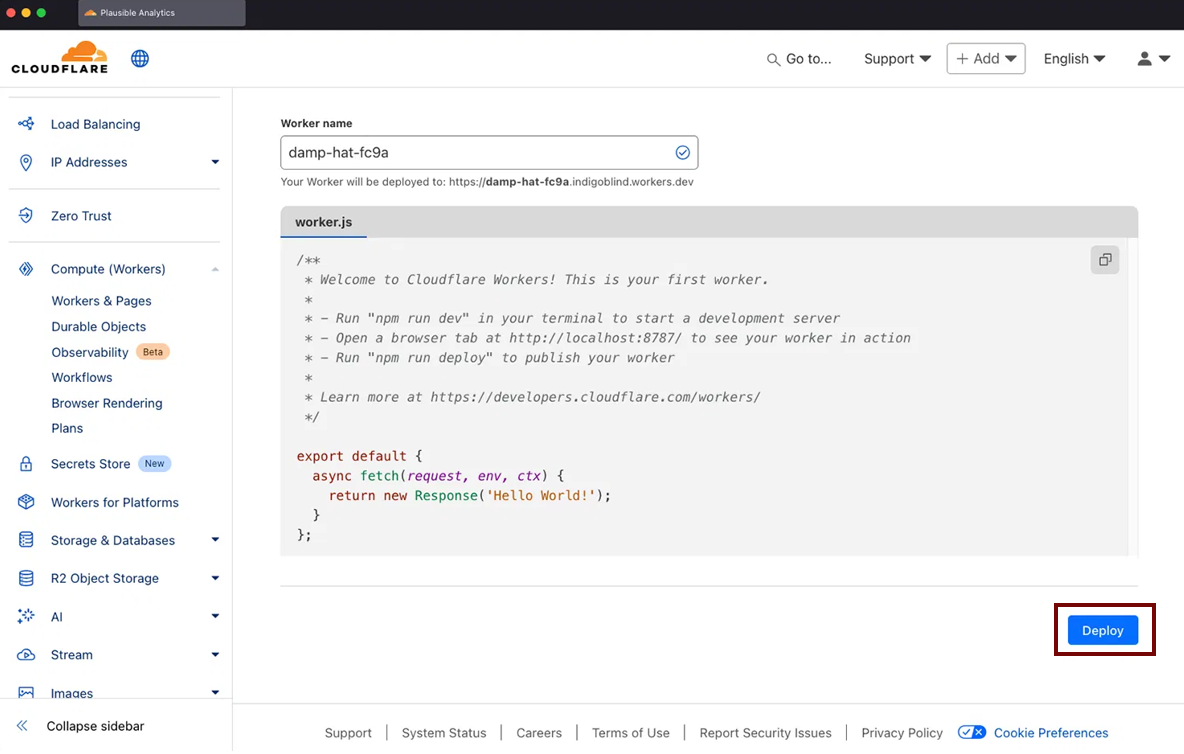
- You can change the service name to give your worker a more meaningful name (for example:
booking-proxy). - Once you have chosen a name, click Deploy.
Don't worry about the code yet, we will edit it in the next step.
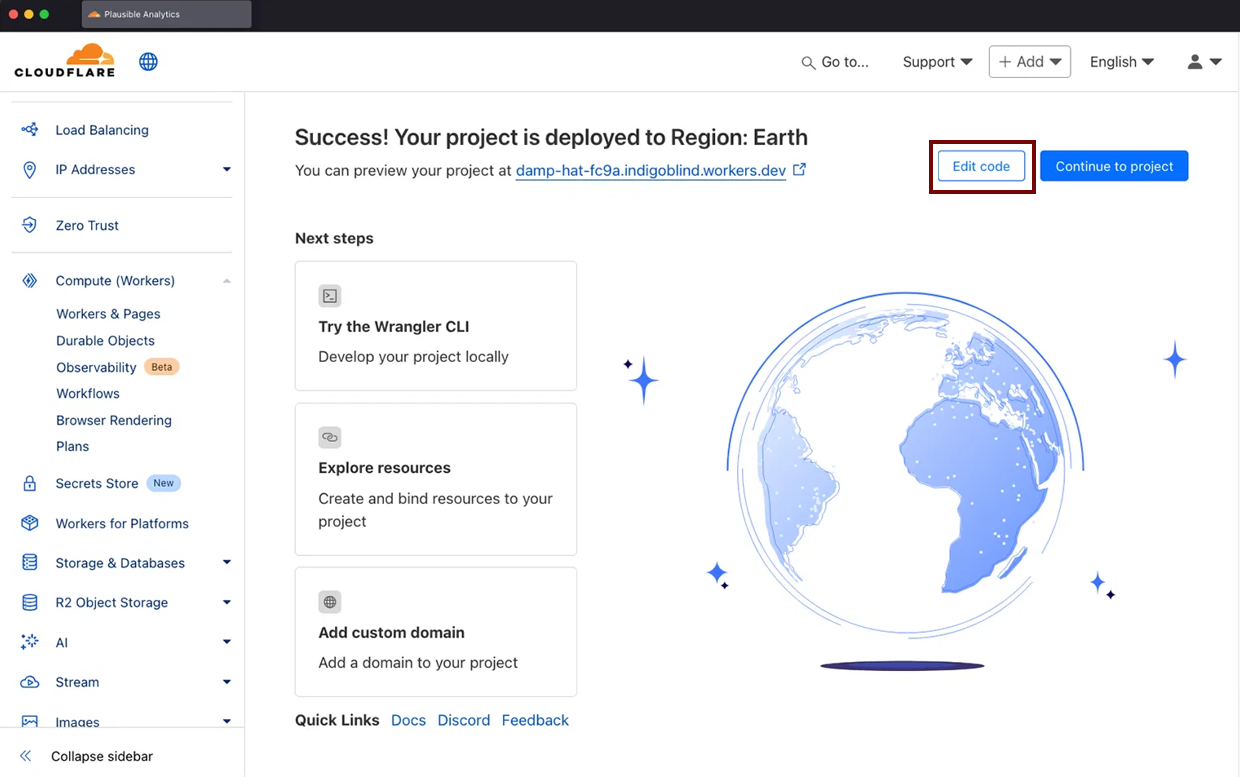
Your worker is now be deployed.
Step 3. Paste the proxy code
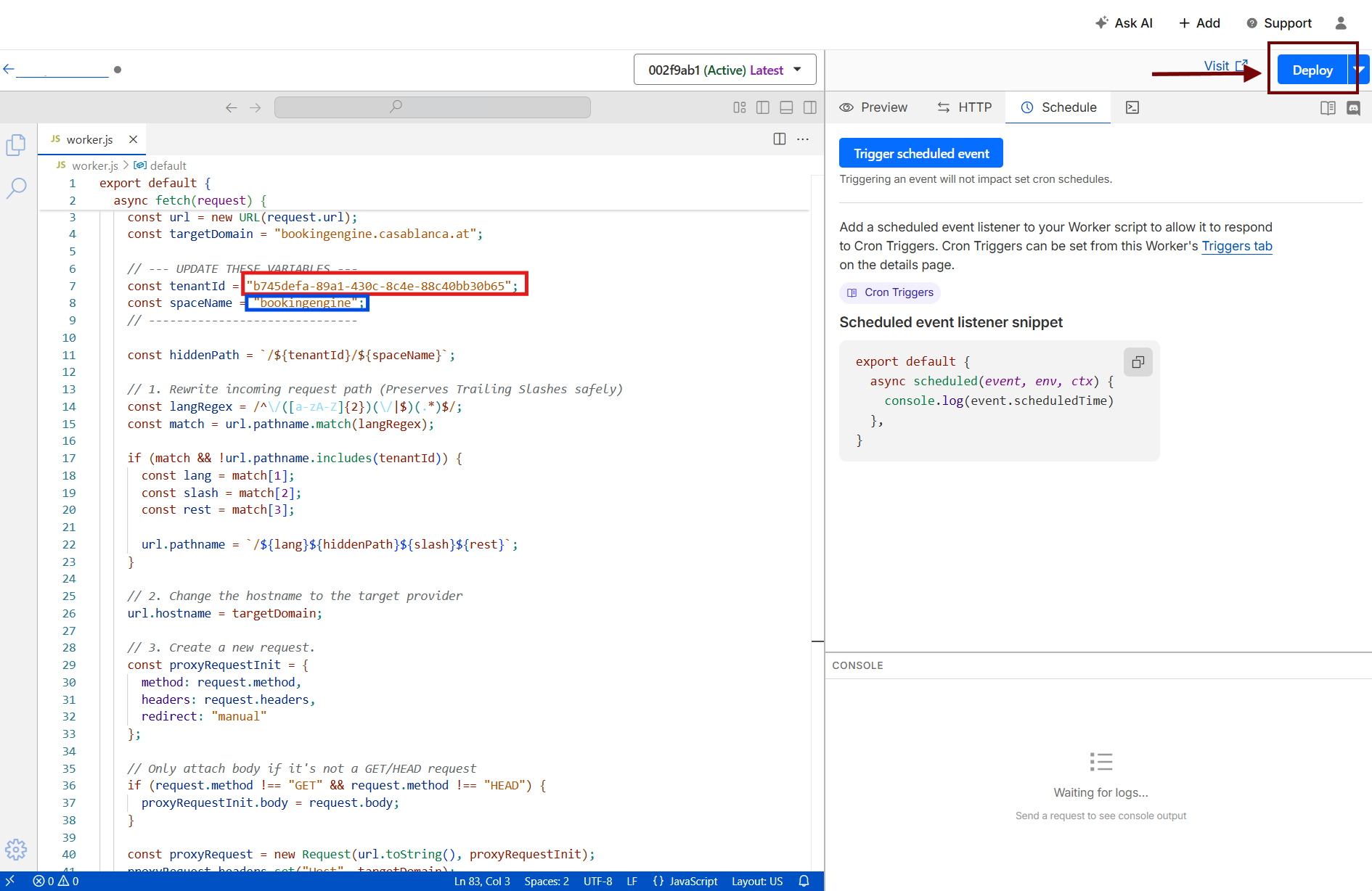
- In the next window, click Edit Code.
- Remove the default
Hello Worldcode that Cloudflare presents, and paste the code provided below instead. - Before saving, you must update two variables at the top of the script:

- tenantId – Replace this with your unique tenant ID provided by us (red marked).
- spaceName – Replace this with your specific space name (blue marked).
Klick to expand
export default {
  async fetch(request) {
    const url = new URL(request.url);
    const targetDomain = "bookingengine.casablanca.at";

    // --- UPDATE THESE VARIABLES ---
    const tenantId = "<tenantId>";
    const spaceName = "<spaceName>";
    // ------------------------------

    const hiddenPath = `/${tenantId}/${spaceName}`;

    // Capture the original public hostname BEFORE we overwrite url.hostname.
    // We need this for rewriting Origin/Referer/Set-Cookie and for X-Forwarded-Host.
    const originalHost = url.hostname;

    // Capture the locale of the CURRENT request (first path segment) before we
    // rewrite the path. We need it in step 7 to rebuild locale-less links.
    const localeMatch = url.pathname.match(/^\/([a-zA-Z]{2})(?:\/|$)/);
    const currentLocale = localeMatch ? localeMatch[1] : "";

    // 1. Rewrite incoming request path (preserves trailing slashes safely)
    const langRegex = /^\/([a-zA-Z]{2})(\/|$)(.*)$/;
    const match = url.pathname.match(langRegex);
    if (match && !url.pathname.includes(tenantId)) {
      const lang = match[1];
      const slash = match[2];
      const rest = match[3];
      url.pathname = `/${lang}${hiddenPath}${slash}${rest}`;
    } else if (url.pathname === "/") {
      // Bare root with no locale: hand the origin the tenant path and let its
      // i18n middleware redirect to the locale-prefixed URL. Step 5 then strips
      // the tenant path back out of the Location header.
      url.pathname = hiddenPath;
    }

    // 2. Change the hostname to the target provider
    url.hostname = targetDomain;

    // 3. Create a new request
    const proxyRequestInit = {
      method: request.method,
      headers: request.headers,
      redirect: "manual"
    };

    // Only attach body if it's not a GET/HEAD request
    if (request.method !== "GET" && request.method !== "HEAD") {
      proxyRequestInit.body = request.body;
    }

    const proxyRequest = new Request(url.toString(), proxyRequestInit);
    proxyRequest.headers.set("Host", targetDomain);

    // --- HEADER HANDLING FOR ANALYTICS / GEO / DEVICE TRACKING ---

    // Rewrite Origin to target so the origin doesn't see a CORS mismatch,
    // but we DON'T delete it (deleting breaks some attribution/anti-fraud logic).
    proxyRequest.headers.set("Origin", `https://${targetDomain}`);

    // Rewrite Referer to point at the target domain equivalent so referrer-based
    // logic on the origin still works. Preserves the path/query for attribution.
    const referer = request.headers.get("Referer");
    if (referer) {
      try {
        const refUrl = new URL(referer);
        // If the referer was on our public domain, rewrite hostname to target.
        // Otherwise (external referer like google.com) pass it through unchanged.
        if (refUrl.hostname === originalHost) {
          refUrl.hostname = targetDomain;
          proxyRequest.headers.set("Referer", refUrl.toString());
        } else {
          proxyRequest.headers.set("Referer", referer);
        }
      } catch {
        // If Referer is malformed, leave it as-is
        proxyRequest.headers.set("Referer", referer);
      }
    }

    // Tell the origin the real public hostname & protocol the user is on.
    // Useful for canonical URLs, server-side rendered analytics, hreflang, etc.
    proxyRequest.headers.set("X-Forwarded-Host", originalHost);
    proxyRequest.headers.set("X-Forwarded-Proto", "https");

    // Cloudflare automatically adds these (no action needed, listed for reference):
    //   CF-Connecting-IP   -> real client IP (authoritative)
    //   CF-IPCountry       -> ISO country code
    //   CF-IPCity, CF-IPLatitude, CF-IPLongitude (on some plans)
    //   X-Forwarded-For    -> appended with client IP
    //
    // Modern Client Hints sent by Chromium browsers (Sec-CH-UA-*, Sec-CH-UA-Mobile,
    // Sec-CH-UA-Platform, etc.) are in request.headers already and we don't strip
    // them, so device detection on the origin keeps working.


    // 4. Fetch the response from the booking engine
    let response = await fetch(proxyRequest);
    response = new Response(response.body, response);


    // Remove strict security headers so it renders on your domain
    response.headers.delete("X-Frame-Options");
    response.headers.delete("Content-Security-Policy");
    // Also drop the report-only variant if present
    response.headers.delete("Content-Security-Policy-Report-Only");


    // 5. Intercept server redirects to hide the long tenant URL
    if ([301, 302, 303, 307, 308].includes(response.status) && response.headers.has("Location")) {
      let location = response.headers.get("Location");
      location = location.replace(`https://${targetDomain}`, `https://${originalHost}`);
      location = location.replace(hiddenPath, "");
      response.headers.set("Location", location);
    }

    // 6. Rewrite Set-Cookie domain attribute so first-party cookies (incl. _ga,
    //    _ga_*, _gid) are scoped to YOUR domain, not the booking engine domain.
    //    This is critical for GA4 cross-page session continuity.
    //
    //    Workers expose multi-value Set-Cookie via headers.getSetCookie() (or
    //    iterating headers). We rewrite each value and re-set them.
    const setCookies = response.headers.getSetCookie
      ? response.headers.getSetCookie()
      : [];
    if (setCookies.length > 0) {
      response.headers.delete("Set-Cookie");
      for (const cookie of setCookies) {
        // Replace any Domain=...targetDomain with our public host.
        // Match both "Domain=bookingengine.casablanca.at" and ".bookingengine.casablanca.at"
        const rewritten = cookie
          .replace(new RegExp(`Domain=\\.?${targetDomain.replace(/\./g, "\\.")}`, "gi"), `Domain=${originalHost}`);
        response.headers.append("Set-Cookie", rewritten);
      }
    }

    // 7. Scrub the HTML (hides the tenant ID from the frontend source code)
    const contentType = response.headers.get("Content-Type") || "";
    if (contentType.includes("text/html")) {
      let html = await response.text();

      const domainRegex = new RegExp(`https://${targetDomain.replace(/\./g, "\\.")}`, 'g');
      html = html.replace(domainRegex, `https://${originalHost}`);

      // Escape the tenantId/spaceName before building regexes out of them,
      // in case either ever contains a regex metacharacter.
      const escapedHiddenPath = hiddenPath.replace(/[.*+?^${}()|[\]\\]/g, '\\$&');

      // 7a. Locale-prefixed links: "/en/<tenant>/<space>/rest" -> "/en/rest".
      //     Step 1 puts the tenant path back on the way in, so these keep working.
      html = html.replace(
        new RegExp(`/([a-zA-Z]{2})${escapedHiddenPath}(?=[/?"'\\\\]|$)`, 'g'),
        '/$1'
      );

      // 7b. Locale-LESS links, i.e. the tenant path at the very start of a quoted
      //     string value: `href="/<tenant>/<space>?..."` -> `href="/en?..."`.
      //     The IBE emits the "back to reservation page" link without a locale;
      //     stripping the tenant path to "" left a bare `?query`, which browsers
      //     resolve against the CURRENT page (the "Zurück" button bug). We swap in
      //     the current locale instead, which step 1 expands back to the full path.
      //
      //     The quote anchor also covers the escaped JSON form inside the Next.js
      //     flight payload (\"href\":\"/<tenant>/<space>?...\"). That payload is what
      //     React hydrates from, so missing it means the fixed HTML gets reverted.
      //
      //     Crucially, requiring a quote immediately before the tenant path means
      //     we DON'T touch paths where it appears mid-string, e.g. the SWR prefetch
      //     cache key "/api/<tenant>/<space>/booking-offers/...". Blindly stripping
      //     that broke the cache key match and forced a redundant client refetch.
      html = html.replace(
        new RegExp(`(["'])${escapedHiddenPath}(?=[/?"'\\\\])`, 'g'),
        `$1/${currentLocale}`
      );

      return new Response(html, {
        status: response.status,
        statusText: response.statusText,
        headers: response.headers
      });
    }

    return response;
  },
};
- Once you have added the code and updated your variables, click Deploy in the top right corner.
Step 4. Route your custom domain to the worker
Now that the proxy logic is running, you need to tell Cloudflare to trigger this Worker whenever someone visits your custom domain (e.g., booking.yourhotel.com).
- Go back to your main Cloudflare dashboard and click on your website domain.
- In the left-hand sidebar, click on Workers Routes (sometimes located under the Workers & Pages or Rules dropdown).
- Click Add Route.
- Define the following parameters:
- Route – Enter your custom domain with a wildcard at the end. For example:
booking.yourhotel.com/* - Worker – Select the
booking-proxyWorker you created in Step 2.
- Route – Enter your custom domain with a wildcard at the end. For example:
- Click Save.
Step 5. Ensure your DNS is configured
For Cloudflare to intercept traffic on your custom subdomain (e.g., booking), there must be a DNS record for it.
- Go to the DNS section of your Cloudflare dashboard.
- Ensure you have an A Record (or CNAME) for your chosen subdomain.
- Type – A
- Name – booking (or whatever subdomain you chose)
- IPv4 address – 192.0.2.1 (This is a dummy IP required to activate Cloudflare routing. The Worker will intercept the traffic before it ever hits this IP).
- Proxy status – 🟠 Proxied (This is strictly required!)
Step 6. Test your CASABLANCA Booking Engine
That’s it! You are now serving your booking engine through a proxy.
- Open your browser and navigate to your custom domain, appending the language code (e.g.,
https://booking.yourhotel.com/de/).
You should see your booking engine load seamlessly. The URL bar will remain clean, your tenant IDs will stay completely hidden, and query parameters (like ?numberOfRooms=1) will work flawlessly.